
Harmony
Harmony
Harmony
Music Based Wellness App built by science with you in mind
Music Based Wellness App built by science with you in mind
Music Based Wellness App built by science with you in mind


About:
About:
I wore many hats on this project, including initial research, looking at what was already out there and running comparative testing against Brain.fm, Endel, and Headspace so we'd know where Harmony actually needed to be different. From there I moved into the UX design work, taking things from rough lo-fi wireframes through to the hi-fi prototype in Adobe XD. I also conducted usability testing, running interview-format sessions. I timed people through tasks and asked questions along the way. Our goal was to compare process times (setup time, success rates), and have the interviewee think aloud during the tasks. This was where most of the useful stuff came out, like where people got confused or what actually felt calming to them.
My Role:
My Role:
My Role:
Problem: Complicated sign-up / sign-in process. Decision fatigue causing users to get overwhelmed while using the app.
Goal: Design an app addressing a clear user problem. Simplify the sign-up process, improve functionality, create a seamless user experience, and design an app that reduces cognitive load on the user.
Harmony is a wellness app that reduces cognitive load while creating a safe space for people who have experienced trauma. It is a sound-based wellness app that creates a platform for healing. It includes mood check-ins, adaptive audio, and a visible emergency reset, all designed to minimize the number of decisions someone has to make.
I wore many hats on this project, including initial research, looking at what was already out there and running comparative testing against Brain.fm, Endel, and Headspace so we'd know where Harmony actually needed to be different. From there I moved into the UX design work, taking things from rough lo-fi wireframes through to the hi-fi prototype in Adobe XD. I also conducted usability testing, running interview-format sessions. I timed people through tasks and asked questions along the way. Our goal was to compare process times (setup time, success rates), and have the interviewee think aloud during the tasks. This was where most of the useful stuff came out, like where people got confused or what actually felt calming to them.
Timeline:
Timeline:
UX Researcher & Designer - Personas, Journey Mapping, Wireframes, Interaction Design, Usability Testing,
Tools:
Tools:
Adobe XD, Lucid, Zoom - Interviews, Google Suite
June 2025 - September 2025
Team:
Team:
Megan Seastedt | Lisa Whalen | Layla Almog
June 2025 - September 2025
Timeline:
UX Researcher & Designer - Personas, Journey Mapping, Wireframes, Interaction Design, Usability Testing
Megan Seastedt | Lisa Whalen | Layla Almog
Adobe XD, Lucid, Zoom - Interviews, Google Suite
UX Researcher & Designer - Personas, Journey Mapping, Wireframes, Interaction Design, Usability Testing,
Megan Seastedt | Lisa Whalen | Layla Almog
Adobe XD, Lucid, Zoom - Interviews, Google Suite
June 2025 - September 2025
Research & Discovery
Research & Discovery
Research & Discovery
Persona:
Nominal Persona: The Mindful Millennial
Name: Alex Smith | Age: 30 | Gender: Female
Alex is a wellness-oriented professional who actively integrates mindfulness, yoga, and
holistic health into her daily routine. She places a high value on evidence-based
practices and seeks personalized solutions in her technological tools.
Fringe Persona: The Resilient Veteran
Name: Ron Alvarez | Age: 65 | Gender: Male
Ron values self-reliance and tends to be skeptical of wellness trends. Nonetheless, he
remains open to technological tools that support sleep, anxiety reduction, and recovery
from trauma, especially those endorsed by his therapist. He prioritizes simplicity and
clarity over aesthetic considerations.
Learn More Here: Harmony - User Personas and Interaction Analysis - 2
Ideation:
The process started with user research, building out a primary persona (a wellness-focused millennial) and a fringe persona (a trauma-sensitive, low-tech veteran) to stress-test the design against very different needs. From there, we ran a requirements analysis, sorting 21 functional, UX, psychological, and technological requirements and ranking them by user impact. Things like non-intrusive notifications, trauma-safe audio, and a quick emergency reset rose to the top. Ideation moved into a flow-mapping and wireframing stage, sketching the full user journey from sign-up through mood check-in, audio sessions, journaling, and progress tracking. We then built a working prototype and tested it against Headspace as a baseline with real participants, measuring setup time, cognitive load, and navigation success. Results fed a final iteration round, keeping what worked (onboarding speed, navigation) while flagging what didn't (mood check-in and emergency reset saw no significant improvement), so the last round of changes focused specifically on fixing those two weak spots.
Learn More Heuristic Analysis: Harmony - Heuristics - 4
Learn More Requirements Analysis: Harmony - Requirements - 3
Ideation:
Ideation:
User Journey / Flowchart
Lo-Fi Wireframes
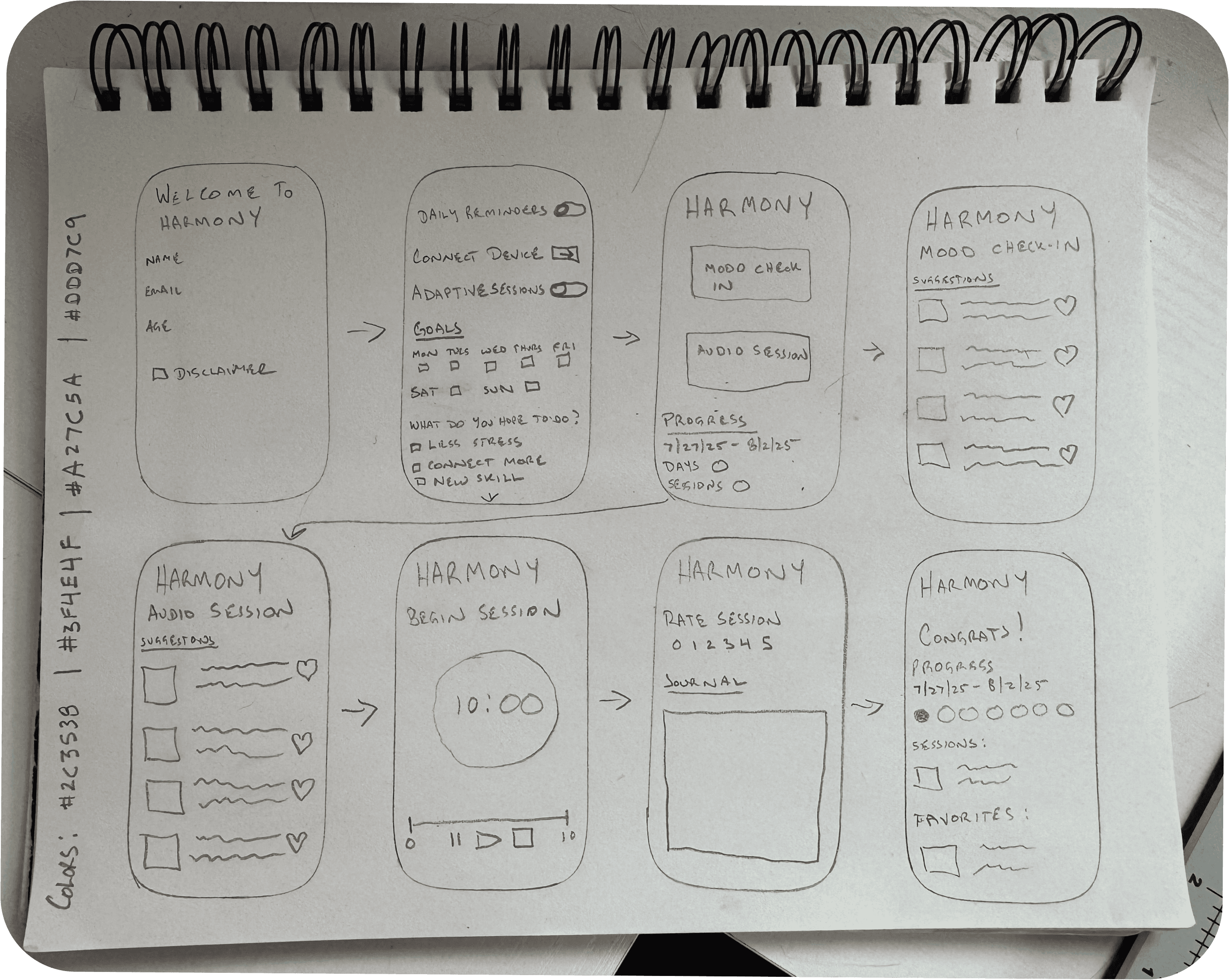

Lo-Fi Wireframes
Testing | Iteration | Results
Testing | Iteration | Results
Testing | Iteration | Results
User Journey / Flowchart
Lo-Fi Wireframes
Weak area found
Mood check-in unclear / adaptive feature confusing
Emergency reset button drew unwanted attention
General onboarding clarity
Session options not clearly clickable
Post-session drop-off
Risk of visual blandness from calming palette
Change made
Added info icons next to settings and descriptions for contextual help
Changed the icon's color to stay identifiable but less visually jarring
Added informative opening pages so new/returning users understand core features faster
Redesigned session pages so linked options are visually obvious
Added a direct link from "Post Session" to "Journal Entries" to encourage continued engagement
Introduced visual variety while keeping the palette calming, to avoid monotony
Testing & Iteration:
Method:
Method:
Method:
Learn More Here: Harmony - Summary of Changes / Change Log - 9
Testing was comparative: each team member ran at least one participant through the same five tasks in both Headspace (baseline) and Harmony (prototype), then measured completion time, success rate, and cognitive load (NASA-TLX), plus a short post-use questionnaire. The five tasks tracked directly to the five design enhancements the team had made: onboarding, mood check-in > session start, locating the emergency reset, navigation exploration, and progress/journaling review.
Qualitative feedback reinforced the pattern: participants praised the simplicity, calming colors, and clean UI ("Startup was clear, simple, and fast," "Colors were calming"), but specifically flagged the adaptive feature as confusing and disliked the red exit button, saying it drew unwanted attention rather than feeling safely discoverable.
Everything that tested well (onboarding speed, navigation, journaling) was preserved with only minor refinement, while the two tasks that showed no significant improvement (mood check-in, emergency reset) got targeted redesigns aimed specifically at discoverability and clarity, without adding complexity that would raise cognitive load.
Results:
Results:
Harmony beat Headspace on setup time by a wide margin, 48 seconds versus 142. People did better navigating and journaling, as well. Cognitive load stayed low across the board, which was a high priority for the design. The mood check-in didn't show any real difference between the two apps. We found that more than half of the participants could not find the emergency reset button, which we noted as an opportunity, given how central that feature was to the whole trauma-informed premise. People did say the interface felt clear and the colors calming.`
Setup time: Harmony significantly faster (M = 48.25s) vs. Headspace (M = 142.50s), p = .017
Navigation and journaling: higher success rates for Harmony, χ²(1, N = 4) = 4.00, p = .046
Mood check-in: no significant difference between the two apps
Participants struggled to locate the emergency reset button
NASA-TLX score: M = 2.00, indicating low cognitive workload
Qualitative feedback: praised clear interface and calming colors; noted confusion with the mood check-in process
Evaluation:
Evaluation:
Business Impact - Harmony's core differentiator is the reduction of cognitive load and reduced process time. The setup was nearly 3x faster than Headspace (48s vs. 142s, statistically significant). Onboarding friction reduction tells us that more people are having a positive experience from the start, which gives the product enhanced value - a product that gets someone to their first meaningful interaction in under a minute has a real shot at improving activation and reducing day-one drop-off compared to competitors.
User Impact - The NASA-TLX score (M = 2.00, low cognitive workload) is telling that Harmony has a real impact on user experience. This also told us that we hit our goal of reducing cognitive load. Combined with the qualitative feedback about the interface feeling clear and the colors calming, this suggests Harmony achieves something most wellness apps don't.
Product Impact - The usability testing validated the concept, while informing our team of improvements before launch, ultimately allowing us to impact the final product anticipating the needs of the users.
Future Improvements Include:
AI-generated audio that adapts in real time instead of pulling from static playlists customizable color themes for people with sensory sensitivities
haptic feedback for accessibility advanced habit-tracking with better long-term progress visualization collaboration with psychologists, HCI researchers, and sound designers to validate emotional regulation effectiveness testing with a much bigger and more varied group of people.
Business Impact - Harmony's core differentiator is the reduction of cognitive load and reduced process time. The setup was nearly 3x faster than Headspace (48s vs. 142s, statistically significant). Onboarding friction reduction tells us that more people are having a positive experience from the start, which gives the product enhanced value - a product that gets someone to their first meaningful interaction in under a minute has a real shot at improving activation and reducing day-one drop-off compared to competitors.
User Impact - The NASA-TLX score (M = 2.00, low cognitive workload) is telling that Harmony has a real impact on user experience. This also told us that we hit our goal of reducing cognitive load. Combined with the qualitative feedback about the interface feeling clear and the colors calming, this suggests Harmony achieves something most wellness apps don't.
Product Impact - The usability testing validated the concept, while informing our team of improvements before launch, ultimately allowing us to impact the final product anticipating the needs of the users.
Future Improvements Include:
AI-generated audio that adapts in real time instead of pulling from static playlists customizable color themes for people with sensory sensitivities
haptic feedback for accessibility advanced habit-tracking with better long-term progress visualization collaboration with psychologists, HCI researchers, and sound designers to validate emotional regulation effectiveness testing with a much bigger and more varied group of people.
Evaluation:
Harmony beat Headspace on setup time by a wide margin, 48 seconds versus 142. People did better navigating and journaling, as well. Cognitive load stayed low across the board, which was a high priority for the design. The mood check-in didn't show any real difference between the two apps. We found that more than half of the participants could not find the emergency reset button, which we noted as an opportunity, given how central that feature was to the whole trauma-informed premise. People did say the interface felt clear and the colors calming.`
Setup time: Harmony significantly faster (M = 48.25s) vs. Headspace (M = 142.50s), p = .017
Navigation and journaling: higher success rates for Harmony, χ²(1, N = 4) = 4.00, p = .046
Mood check-in: no significant difference between the two apps
Participants struggled to locate the emergency reset button
NASA-TLX score: M = 2.00, indicating low cognitive workload
Qualitative feedback: praised clear interface and calming colors; noted confusion with the mood check-in process
Testing & Iteration:
Weak area found
Mood check-in unclear / adaptive feature confusing
Emergency reset button drew unwanted attention
General onboarding clarity
Session options not clearly clickable
Post-session drop-off
Risk of visual blandness from calming palette
Change made
Added info icons next to settings and descriptions for contextual help
Changed the icon's color to stay identifiable but less visually jarring
Added informative opening pages so new/returning users understand core features faster
Redesigned session pages so linked options are visually obvious
Added a direct link from "Post Session" to "Journal Entries" to encourage continued engagement
Introduced visual variety while keeping the palette calming, to avoid monotony
Harmony is a semi-functional prototype in Adobe XD. The design was based on the requirements mapped out in the early stages of research, and leaning on frameworks like Shneiderman's Eight Golden Rules and Norman's Seven Stages of Action to keep the design grounded and intuitive. The core features - mood check-in, emergency reset, safe mode, journaling, progress tracking - were all built around the idea that someone using this app might already be at their limit, so the interface couldn't ask more of them than they had to give. To see if that actually held up, we ran usability tests against Headspace, having participants work through five tasks (setup, mood check-in, finding the emergency reset, navigating, checking progress) while we timed them and asked questions along the way, and used NASA-TLX afterward to get a read on cognitive load.
Learn More Here: Harmony - Critical Design Features and Testing Methodology - 7
Harmony is a semi-functional prototype in Adobe XD. The design was based on the requirements mapped out in the early stages of research, and leaning on frameworks like Shneiderman's Eight Golden Rules and Norman's Seven Stages of Action to keep the design grounded and intuitive. The core features - mood check-in, emergency reset, safe mode, journaling, progress tracking - were all built around the idea that someone using this app might already be at their limit, so the interface couldn't ask more of them than they had to give. To see if that actually held up, we ran usability tests against Headspace, having participants work through five tasks (setup, mood check-in, finding the emergency reset, navigating, checking progress) while we timed them and asked questions along the way, and used NASA-TLX afterward to get a read on cognitive load.
Learn More Here: Harmony - Critical Design Features and Testing Methodology - 7
Learn More Here: Harmony - Summary of Changes / Change Log - 9
Testing was comparative: each team member ran at least one participant through the same five tasks in both Headspace (baseline) and Harmony (prototype), then measured completion time, success rate, and cognitive load (NASA-TLX), plus a short post-use questionnaire. The five tasks tracked directly to the five design enhancements the team had made: onboarding, mood check-in > session start, locating the emergency reset, navigation exploration, and progress/journaling review.
Qualitative feedback reinforced the pattern: participants praised the simplicity, calming colors, and clean UI ("Startup was clear, simple, and fast," "Colors were calming"), but specifically flagged the adaptive feature as confusing and disliked the red exit button, saying it drew unwanted attention rather than feeling safely discoverable.
Everything that tested well (onboarding speed, navigation, journaling) was preserved with only minor refinement, while the two tasks that showed no significant improvement (mood check-in, emergency reset) got targeted redesigns aimed specifically at discoverability and clarity, without adding complexity that would raise cognitive load.
Harmony is a semi-functional prototype in Adobe XD. The design was based on the requirements mapped out in the early stages of research, and leaning on frameworks like Shneiderman's Eight Golden Rules and Norman's Seven Stages of Action to keep the design grounded and intuitive. The core features - mood check-in, emergency reset, safe mode, journaling, progress tracking - were all built around the idea that someone using this app might already be at their limit, so the interface couldn't ask more of them than they had to give. To see if that actually held up, we ran usability tests against Headspace, having participants work through five tasks (setup, mood check-in, finding the emergency reset, navigating, checking progress) while we timed them and asked questions along the way, and used NASA-TLX afterward to get a read on cognitive load.
Learn More Here: Harmony - Critical Design Features and Testing Methodology - 7
Results:
Weak area found
Mood check-in unclear / adaptive feature confusing
Emergency reset button drew unwanted attention
General onboarding clarity
Session options not clearly clickable
Post-session drop-off
Risk of visual blandness from calming palette
Change made
Added info icons next to settings and descriptions for contextual help
Changed the icon's color to stay identifiable but less visually jarring
Added informative opening pages so new/returning users understand core features faster
Redesigned session pages so linked options are visually obvious
Added a direct link from "Post Session" to "Journal Entries" to encourage continued engagement
Introduced visual variety while keeping the palette calming, to avoid monotony
Change made
Added info icons next to settings and descriptions for contextual help
Changed the icon's color to stay identifiable but less visually jarring
Added informative opening pages so new/returning users understand core features faster
Redesigned session pages so linked options are visually obvious
Added a direct link from "Post Session" to "Journal Entries" to encourage continued engagement
Introduced visual variety while keeping the palette calming, to avoid monotony